
At the entrance: welcome and Wi-Fi
A welcome page with the name of your space, reception hours and the Wi-Fi details. Add a QR code with the QR code app, for example to the sign-up page of an event.
Browse the office templates →A welcome page with the Wi-Fi at the entrance, who is on which floor in the corridor, this week’s events in the kitchen. Each display shows what suits its spot, and you manage them all in Lumicast.
Try Team for 14 days. No payment details needed.
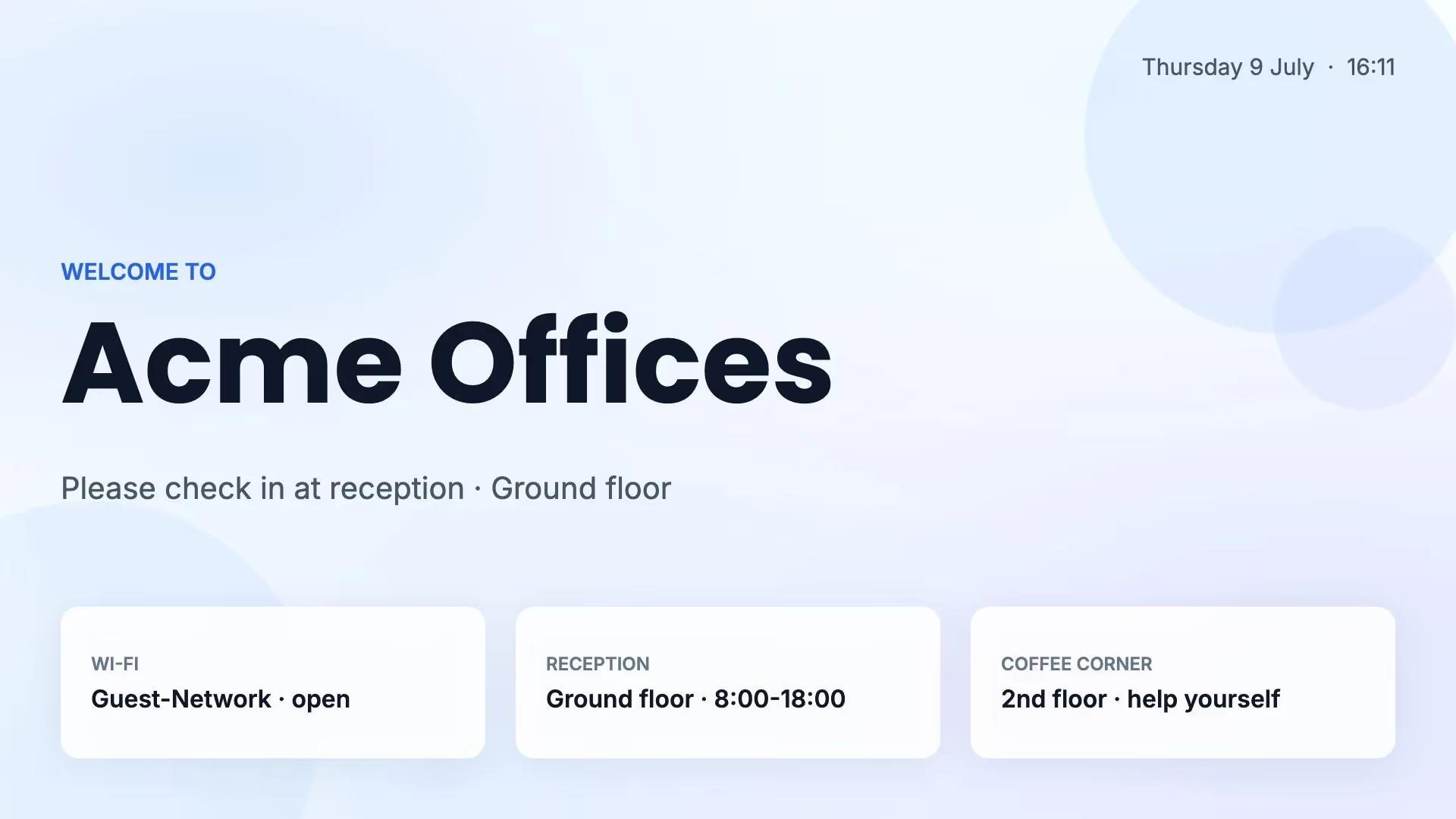
People look at a display in a coworking space for different reasons: a visitor is looking for reception, a member for a meeting room, and everyone wants to know what is on tonight. That is why each display in Lumicast gets its own page or playlist.
A welcome page with the name of your space, reception hours and the Wi-Fi details. Add a QR code with the QR code app, for example to the sign-up page of an event.
Browse the office templates →An overview of the companies per floor, with the way to the lifts and toilets. When someone moves, you change one line.
Digital wayfinding →This week’s events from your calendar, a new member introducing themselves, and the birthdays and anniversaries of the month.
Calendar app guide →A display next to the door shows whether the room is free and what the next booking is, straight from the room’s calendar.
Meeting room displays →A new tenant, a move, an event that has changed: that should be a matter of changing text, not of a new design.
Connect the calendar where you plan events with an ICS link. The Calendar app shows today’s or this week’s events as a list, and the displays follow when the calendar changes.
Included in every plan.
Turn the page into a template page and choose which fields someone can change, such as a company name or a floor. The layout stays as you set it.
With Team.
Lots of companies in the building? Keep the list in a Lumicast table or import a CSV file. One row of the design repeats for every company, and every display with that overview is right at once.
With Team.
Do you run more than one coworking space? Then you want the same message on every location, and still the right content on each display.
Schedule a message, such as the summer party, as a campaign on every display with the same tag. After the last day, the campaign stops by itself.
The entrance shows the welcome, the kitchen the events. For each display you choose the playlist and the times it plays.
Let the community manager of each location manage their own displays. With Team you divide locations over workspaces and choose who can edit and who can publish.
One display at the entrance is enough to see how it works.
Start with a template, or ask Lumi, our AI designer, for a first design. Fill in the name of your space, the reception hours and the Wi-Fi details.
Create a Calendar app with the ICS link of your events calendar and put it in the same playlist as the welcome page.
Professional displays from Samsung, LG and Philips run Lumicast without a separate player. For other displays, you connect a player.
Open a template in Lumicast and replace the sample text with the details of your space.
Many coworking spaces also have a café, a floor of meeting rooms or a reception with its own content. It all runs from the same account.
Welcome pages, the Calendar app, scheduling and campaigns are included in Solo. Template pages for colleagues, tables and several workspaces need Team.
From €17 per display per month
Solo billed yearly, or €21 monthly. Team: €20 per display per month billed yearly, or €25 monthly. All prices exclude VAT.
Compare plans →Yes. The Wi-Fi template shows the network name and password in large type, or you put them on your welcome page. Want visitors to scan them? Add a QR code with the QR code app. Use a separate guest network, because anyone who walks past can read the password.
No. The display shows what is in your calendar. Booking and signing up happen in your own booking or events system. You can put a QR code to the sign-up page on the display.
With any calendar that gives you an ICS link, such as Google Calendar or Outlook. Is your events calendar in another system? Check whether it can give you an ICS link. If not, put the event on a page yourself.
You decide. With Solo you change the page yourself. With Team, the community manager gets a template page in which only the fields you choose can be changed, or a table. With an edit link, someone without an account can also change the rows of a table. Anyone with the link can edit, and you can stop sharing at any time.
Yes. With Team you divide locations over workspaces and give colleagues roles. A campaign on every display with the same tag puts the same message on every location.
Yes. You can try Lumicast free for 14 days, without payment details. Start with the display at the entrance.
Put a welcome page with the Wi-Fi on one display and see how it works. Questions about the hardware or your calendar? We are happy to help.
Try Team for 14 days. No payment details needed.