
What is digital signage?
Everything you need to know about digital signage, also known as narrowcasting: what it is, how it works, and how to use it effectively.
Definition of digital signage
Digital signage is a powerful way to inform and activate a specific target audience. With digital displays and digital signage software like Lumicast, you can easily show relevant content to the right people. In Dutch, the practice is usually called narrowcasting.
Broadcasting targets a broad audience (think TV and radio). Digital signage and narrowcasting serve a specific audience with tailored content, which makes them ideal for internal communication, customer experience, and marketing.
The benefits of digital signage
A poster gets printed once and ages from day one. A display is never finished: it grabs attention with motion, stays current, and serves a different purpose at nine in the morning than at five in the afternoon.
And because the software does the managing, one person can keep dozens of displays across multiple locations up to date without leaving their desk.
- Grabs attention: moving content gets noticed where static posters are ignored.
- Always up to date: change content in seconds, no printing and no USB sticks.
- Centrally managed: control every display in every location from one place.
- One display, many purposes: rotate news, promotions, and practical information.
- Live content: data, schedules, and feeds update themselves.
- Professional appearance: a polished first impression for visitors and staff.
Where digital signage works
Digital signage is used in many sectors. From waiting rooms to retail stores: wherever targeted communication is needed, narrowcasting offers a solution.

Hospitality
- Menu boards that update in seconds
- Daily specials and promotions on screen
- Welcome boards with hours and Wi-Fi
Restaurants
- Menus that follow the kitchen
- Tonight's specials in one edit
- Lunch hands over to dinner automatically
Healthcare
- Display important health information
- Give staff real-time updates
- Use digital wayfinding
Retail
- Create urgency and increase revenue
- Improve customer experience
- Manage displays across multiple locations
Transport & Logistics
- Show current departure and arrival times
- Motivate employees with internal updates
- Give travellers real-time traffic and weather information
Offices & workplaces
- Welcome screens for visitors
- Meeting room boards from your calendar
- Live KPI dashboards on the wall
Gyms & fitness
- Class schedules that update themselves
- Challenges and coaching tips on the floor
- Promotions for PT and memberships
Salons & barbers
- Price lists that are always right
- Product promos for the client in the chair
- Hours and booking info in the window
Education
- Display school schedules (e.g. via Zermelo)
- Share news and events
- Use digital boards during open days
Hotels
- Welcome boards with today's programme
- Breakfast hours that switch automatically
- Guest info without the paper stands
Real estate
- Window listings that update instantly
- Open house and just-sold boards
- Presents after closing time
Churches
- Service times that are always current
- Weekly programme without reprints
- Simple enough for every volunteer
Industry & logistics
- Safety record visible to everyone
- Shift rosters without reprints
- Site rules at the gate
What do you show on the displays?
Anything your audience needs to see, in any mix. These are the things our customers put on their displays every day:
Most of it updates itself: apps and datasources pull live information straight onto your displays, so nobody has to maintain it by hand.
Digital signage software: how does it work?
Good digital signage software offers flexibility in content and management. With Lumicast you can:
Photos & videos
Upload photos and videos to your content library and show them on your displays for visual impact.
Apps & integrations
Integrate apps, like social media feeds, to show existing content directly on your displays.
Websites
Embed websites to show real-time information from external sources.
Dynamic pages
Create dynamic pages with Lumicast’s intuitive drag-and-drop page editor. Always live, no preview step.
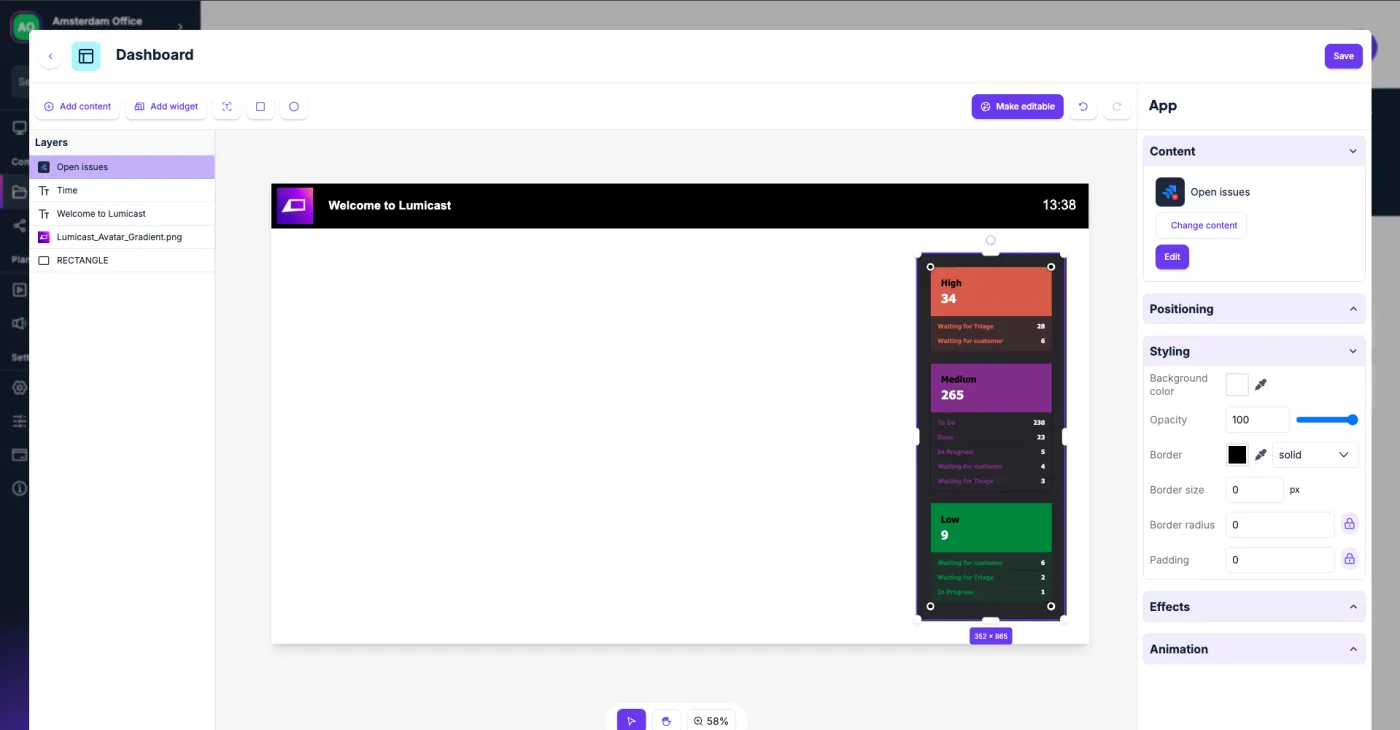
The Lumicast page editor: drag, drop, and what you see is live on your displays.
The technical side, kept simple
Choosing the right hardware
Digital signage works with two components: the software (like Lumicast) and the hardware, meaning the display plus a player. You can choose from:
- SoC displays (like Samsung and LG): cheaper and easy to install, the player is built into the display.
- External players (e.g. a Raspberry Pi or Windows PC): more powerful and flexible.
Installing the software
- 1 Download the Lumicast Player
- 2 Enter the pairing code via the web app
- 3 Manage and schedule your content remotely
What does digital signage cost?
Two cost components: hardware (one-time) and software (monthly). Both are smaller than most people expect, especially if you already have displays hanging.
- You already have a display? Add a Raspberry Pi for about €70 and it becomes a signage display.
- Buying new? A SoC display (Samsung, LG) has the player built in, so there's nothing extra to buy or mount.
- Something in between? Any spare Windows, Mac, Linux or Android device can be the player.
Every plan includes the full platform: unlimited storage, scheduling, the page editor, and remote fleet management. Start free, upgrade when your network grows.
See full pricing →Getting started with digital signage
From nothing to content on a display in four steps.
Create a free account
Sign up at app.lumicast.com. No payment details required.
Connect a display
Install the Lumicast Player on your display or player device and enter the pairing code.
Add your content
Upload media, connect apps, embed websites, or build pages in the editor.
Schedule and go live
Put content in playlists and campaigns. Changes appear on your displays instantly.
What is the difference between digital signage and narrowcasting?
What does digital signage software cost?
What hardware do I need?
Can I show live data, news, or schedules?
Does digital signage need a permanent internet connection?
Can I use displays in portrait mode?
How long does it take to set up?
Can I manage displays across multiple locations?
Start with digital signage today
Internal communication, marketing, or customer experience: Lumicast has everything you need to run your displays.