Apps and integrations

Airtable on your displays.

Is your schedule, your offer or your list of announcements in Airtable? Connect the table to Lumicast and every record gets a place in a design you can read from across the room. Change a field in Airtable and the new value is on your displays within 5 minutes.

Try Team for 14 days. No payment details needed.

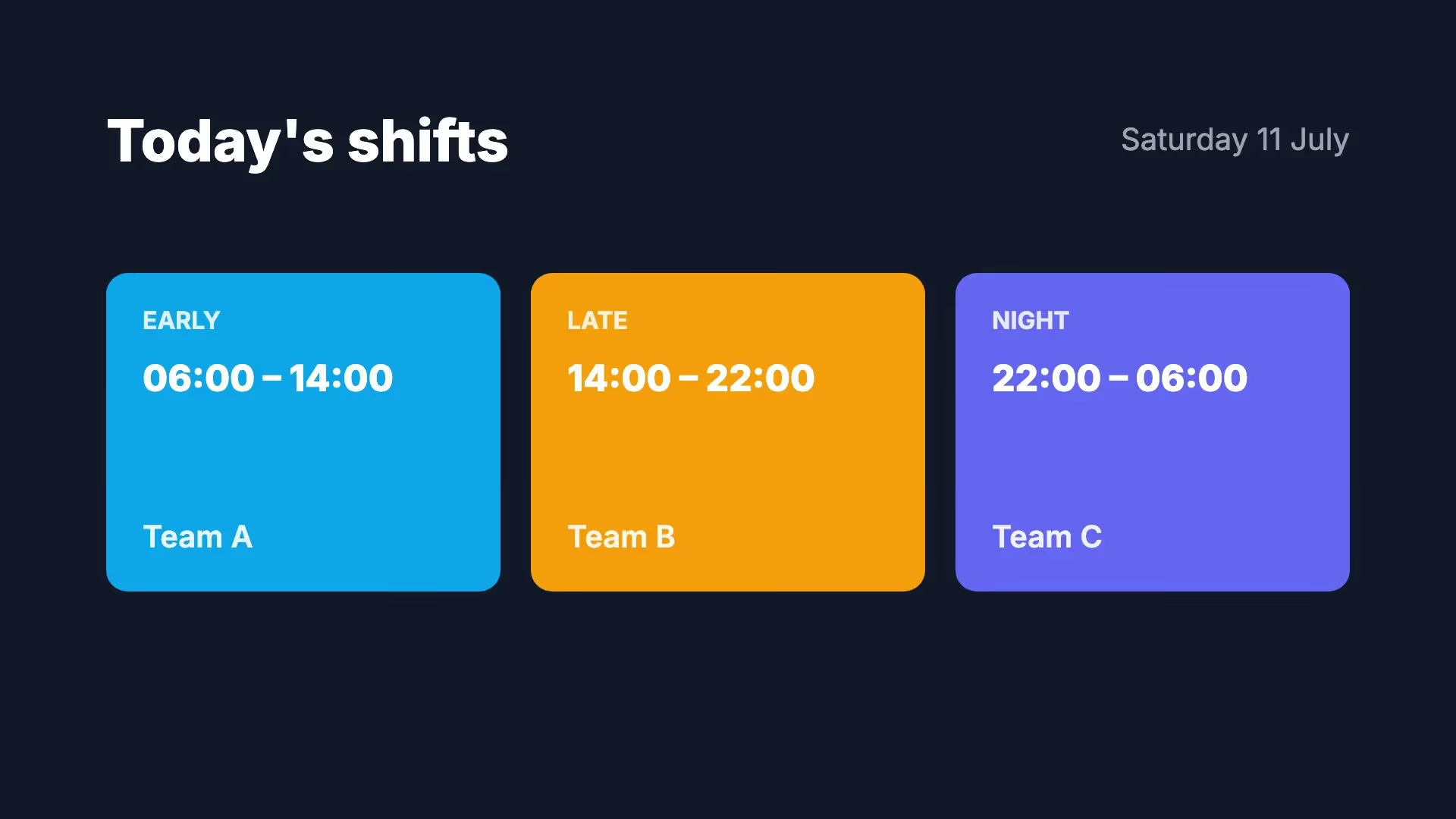
A display showing today’s shifts: early, late and night, each with a time and a team
The today’s shifts template with sample data. You link each shift to a record in your table.

Why not put the Airtable view itself on a TV?

A view in a browser on a TV looks like the quickest route. For a display that hangs on a wall all day, there are better options.

Opening a shared view

Airtable can share a view with a link, and you open that link in a browser on the display. A shared view is meant for anyone with the link, and you see Airtable’s grid or gallery rather than a design made for a display. Not what you want for a list of names or internal figures.

Retyping or exporting

You copy the data into a page or a file by hand. That works until the first change: after that, someone has to remember to update the display.

The records in your own design

Lumicast reads the table you choose with read-only access and places the values in a page you design yourself. Your base stays private and the display never signs in to Airtable.

What you can put on a display.

Anything you keep as records in a table. A few examples:

A schedule or rota

Today’s shifts, this week’s projects or who is at which location. You change it where you already keep it.

A programme

Sessions, workshops or appointments with a time and place. Sort them by date and show only the next five.

Listings and prices

Properties, products or treatments with their prices. Change something in your base and the display is right a few minutes later.

Messages you switch on and off yourself

Give every message a Show checkbox in Airtable and filter in Lumicast on the records where it is ticked. That way you decide in your base what appears on the display.

A status board

Orders ready for collection, requests in progress or the state of a project. Filter on the text of a status field, for example only the records marked Ready.

Who’s where

Colleagues, teams or rooms from the list you already keep in Airtable, per floor or per department.

Design one line, the rest follows.

In the editor, design one line of your list, or start from a template or a draft by Lumi, our AI designer. Group that line and link the group to the records of your table, and it repeats for every record. Type / in a text layer, choose Group field and open fields. That is where your fields are, named as in Airtable.

How to link data to a page →
Type / where the figure should go and pick the field from your data source. From then on it always shows the latest value.
The Lumicast editor with a metalworks’ production board. Where the units count goes, a menu lists the fields of the ‘Productie hal A’ data source with their current values. The other figures already come from that data source.

How to set it up.

All you need is an Airtable account that can open the base.

  1. Sign in with Airtable

    Create a data source with Airtable and sign in. Airtable lets you choose which bases Lumicast may use. Lumicast only asks to read records and to see your bases and tables.

  2. Choose the base and table

    Choose the base, then the table. Lumicast fetches the records of that table, with the fields it contains.

  3. Design and schedule

    Link the fields to your page, add the page to a playlist and choose which displays play it, and when.

Good to know.

Airtable works differently from a spreadsheet in a few ways. Keep these in mind while you design.

The first 100 records

Lumicast asks for the table’s records in one go, and Airtable returns at most 100 of them. If your table has more, you only see those first 100. Better to make a separate table for your display with only what belongs on it.

The table, not a view

Lumicast reads the table as it is, whatever the filters and sorting of your views in Airtable. You filter, sort and set a limit in Lumicast, with a subset of your data source.

Values and links

Text, numbers, checkboxes and dates come through as values. A field that points to another table gives the ids of those records. To show the name, add a lookup or formula field in Airtable.

Photos and attachments

Lumicast does not store attachments from Airtable. Photos and videos for your display go in Lumicast’s content library.

Every 5 minutes

Lumicast fetches the table every 5 minutes. For Airtable, you don’t set that interval yourself.

If the connection expires

Lumicast renews its access to Airtable by itself. If Airtable withdraws access anyway, the connection shows as Expired in your data sources and they stop updating until you click Reconnect.

Start with a template.

These templates are made for lists and overviews on a display. Open one in Lumicast and replace the sample text with fields from your table.

Use this template →
Use this template →
Use this template →
Use this template →
Browse all templates →

Airtable, Google Sheets or a table of your own?

If you already keep your data in Airtable, there is nothing to move. If it lives in a spreadsheet, or you would rather keep it in Lumicast itself, there are other connections for that.

What does it cost?

Data connections such as Airtable come with Team. Try it for 14 days with your own base, no payment details needed.

€20 per display per month

Billed yearly, or €25 billed monthly. All prices exclude VAT.

Compare plans →

Frequently asked questions

Which tables can I choose?

Any table in the bases you give access to when you sign in. In Lumicast, you choose the base first and then the table.

How many records can I show?

Lumicast fetches the first 100 records of the table. If you have more, make a separate table for your display. If not every record fits on the display at once, a group can move on to the next records after a few seconds.

How quickly does a change reach the display?

Lumicast fetches the table every 5 minutes. After that, the new value appears on the displays showing the page.

What can Lumicast see and change in my base?

Lumicast asks for read access to the records and the structure of the bases you choose, and never changes anything in Airtable. Prefer a separate Airtable account for the displays? Then share only the bases that go on a display with it.

What happens if the internet connection drops?

The display keeps showing the last data it received and says that the content may not be up to date. When the connection returns, the new data appears.

Can we try it with our own base?

Yes. During the 14-day trial, you can connect your own Airtable account. If you do not choose a plan afterwards, the displays stop playing. Your workspace and content remain available.

Put your own table on a display.

Connect your base during the trial and see how your data looks from across the room. Questions about the connection? We’re happy to help.

Try Team for 14 days. No payment details needed.